Computer Graphics Clipping: Trimming the Invisible
কম্পিউটার গ্রাফিক্স ক্লিপিং: স্ক্রিনের বাইরের দুনিয়া ছেঁটে ফেলা!
Hello! Today I learned another fascinating topic in Computer Graphics called Clipping. In simple terms, clipping means 'cutting with scissors'!
- What it is: It is the process of identifying the visible portion of a picture and discarding the parts that fall outside the screen (or viewing window).
- How it works: When clipping, lines are divided into 3 categories:
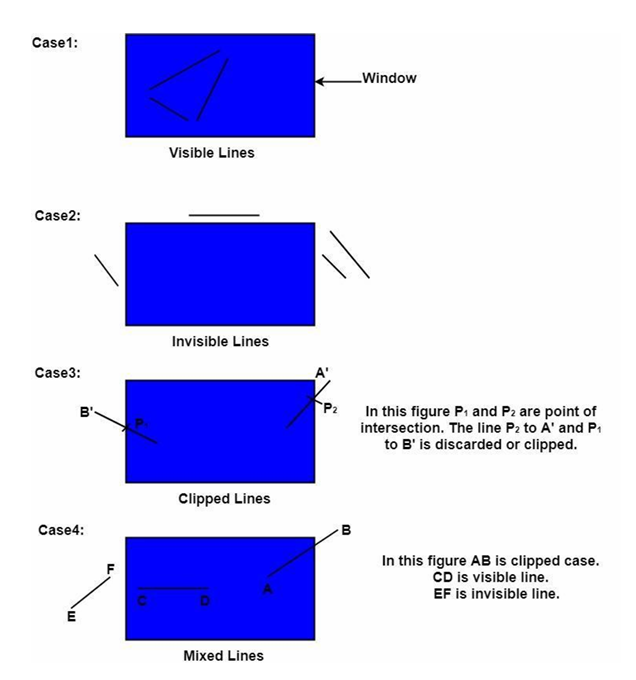
- Visible: The line is completely inside the window. It is kept as is.
- Invisible: The line is completely outside the window. It is rejected.
- Clipped: The line partially crosses the boundary. The outside portion is cut off.
Here are the 4 main cases of clipping I studied:
Clipping can be done via both Hardware and Software. There are many types: Point, Line, Area (Polygon), Curve, Text, and Exterior Clipping.
- Why it matters: Processing pixels that are outside the screen is a waste of CPU/GPU power. Clipping drastically speeds up rendering and saves memory.
Point Clipping
This is the simplest form. To check if a specific point $(x, y)$ is inside the window, it must satisfy all 4 inequalities:
- $X \le X_{max}$
- $X \ge X_{min}$
- $Y \le Y_{max}$
- $Y \ge Y_{min}$ If even one condition is false, the point is invisible. This is super useful for rendering weather effects like rain or snow particles!
Line Clipping & Cohen-Sutherland Algorithm
This was the most exciting part! I learned the Cohen-Sutherland Line Clipping Algorithm, which is incredibly fast because it uses bitwise codes.
- How it works: The entire 2D space is divided into 9 regions. Each region gets a 4-bit Region Code (or Outcode) following the sequence: [Top, Bottom, Right, Left].
- The center window code is
0000(Visible). - Top is
1000, Bottom is0100, Right is0010, Left is0001. - Corners are combinations (e.g., Top-Left is
1001).
- The center window code is
The Algorithm Steps:
- Find the region codes of the two endpoints.
- Do a Bitwise OR. If the result is
0000, the line is completely Visible. - If OR is not zero, do a Bitwise AND. If the AND result is NOT
0000(e.g.,1000), the line is completely outside on one side. It is Invisible (Trivially Rejected). - If the AND result is exactly
0000, the line crosses the window boundary. It is a Clipped Case.
When clipping, we must find the intersection point using the line's slope ($m$): $$m = \frac{y_2 - y_1}{x_2 - x_1}$$
Boundary intersection formulas:
-
Left Boundary ($x = x_{min}$): $y = y_1 + m(x_{min} - x_1)$
-
Right Boundary ($x = x_{max}$): $y = y_1 + m(x_{max} - x_1)$
-
Top Boundary ($y = y_{max}$): $x = x_1 + \frac{y_{max} - y_1}{m}$
-
Bottom Boundary ($y = y_{min}$): $x = x_1 + \frac{y_{min} - y_1}{m}$
-
Why it matters: This algorithm uses simple bitwise AND/OR operations to instantly accept or reject lines without complex multiplication or division. It makes rendering huge graphics unbelievably fast!
[!NOTE] IMPORTANT NOTES FOR NOTEBOOK Concept: Cohen-Sutherland Line Clipping Algorithm Key Point 1: Divides the 2D space into 9 distinct regions, assigning a 4-bit region code (Top, Bottom, Right, Left) to each endpoint. Key Point 2: Uses bitwise OR for trivial acceptance and bitwise AND for trivial rejection before performing any intersection math. Advantage: Extremely fast at rejecting lines completely outside huge viewports, saving valuable CPU/GPU cycles. Disadvantage: If a line requires clipping, calculating intersections involves floating-point division, which can be repetitive for complex multi-region lines.
হ্যালো! আজ আমি কম্পিউটার গ্রাফিক্সের আরও একটি দারুণ টপিক শিখলাম, যার নাম Clipping (ক্লিপিং)। সাধারণ ভাষায় বলতে গেলে, ক্লিপিং মানে হলো 'কাঁচি দিয়ে কেটে ফেলা'!
- What it is: কোনো একটি বড় ছবির যে অংশটুকু স্ক্রিনের বাইরে চলে যায়, সেটিকে বাদ দিয়ে শুধু ভেতরের দৃশ্যমান অংশটুকুকে চিনে নেওয়ার প্রক্রিয়াকেই Clipping বলে।
- How it works: আমি জানলাম, ক্লিপিং করার সময় লাইনের অবস্থান বিবেচনা করে সেটিকে ৩টি ক্যাটাগরিতে ভাগ করা হয়: ১. Visible: লাইনটি পুরোপুরি উইন্ডোর ভেতরে থাকলে তা দৃশ্যমান এবং সেটি যেমন আছে তেমনই রাখা হয়। ২. Invisible: লাইনটি পুরোপুরি উইন্ডোর বাইরে থাকলে সেটি অদৃশ্য এবং সরাসরি বর্জন (reject) করা হয়। ৩. Clipped: লাইনের কিছু অংশ ভেতরে আর কিছু অংশ বাইরে থাকলে, বাইরের অংশটুকু কেটে ফেলা হয়।
নিচের ডায়াগ্রামটিতে ক্লিপিংয়ের প্রধান ৪টি কেস (Case) দেখানো হয়েছে:
মনে রাখবে, ক্লিপিং Hardware এবং Software দুইভাবেই করা যায়। এর বেশ কয়েকটি প্রকারভেদ আছে: Point, Line, Area (Polygon), Curve, Text, এবং Exterior Clipping।
- Why it matters: স্ক্রিনের বাইরে যা আছে তা প্রসেস বা ড্র করার কোনো মানে হয় না। ক্লিপিং করার ফলে কম্পিউটারের প্রসেসরের ওপর চাপ কমে এবং গ্রাফিক্স অনেক দ্রুত লোড হয়!
পয়েন্ট ক্লিপিং (Point Clipping)
এটি সবচেয়ে সহজ ক্লিপিং। কোনো একটি নির্দিষ্ট বিন্দু বা পয়েন্ট $(x, y)$ উইন্ডোর ভেতরে আছে কি জনপ্রিয় না, তা পরীক্ষা করার জন্য নিচের ৪টি কন্ডিশন অবশ্যই সত্য হতে হবে: ১. $X \le X_{max}$ ২. $X \ge X_{min}$ ৩. $Y \le Y_{max}$ ৪. $Y \ge Y_{min}$ যদি এই ৪টি কন্ডিশনের মধ্যে যেকোনো একটিও মিথ্যা (false) হয়, তবে পয়েন্টটি অদৃশ্য হয়ে যাবে। গেমে বৃষ্টির ফোঁটা বা তুষারপাত রেন্ডার করার সময় এটি ভীষণ কাজে লাগে!
লাইন ক্লিপিং এবং Cohen-Sutherland Algorithm
এটি লেকচারের সবচেয়ে চমৎকার অংশ ছিল! আমি Cohen-Sutherland Line Clipping Algorithm সম্পর্কে জানলাম। এটি একটি অত্যন্ত ফাস্ট অ্যালগরিদম যা বিটওয়াইজ কোড ব্যবহার করে লাইনের অবস্থান সনাক্ত করে।
- How it works: এই অ্যালগরিদমে পুরো স্ক্রিন বা স্পেসকে ৯টি অঞ্চলে ভাগ করা হয়। প্রতিটি অঞ্চলকে একটি ৪-বিটের কোড দেওয়া হয়, যাকে বলা হয় Region Code বা Outcode। এই ৪টি বিটের সিকোয়েন্স হলো: [Top, Bottom, Right, Left]।
- মাঝখানের উইন্ডোটির কোড হলো
0000(আসল দৃশ্যমান স্ক্রিন)। - Top-এ
1000, Bottom-এ0100, Right-এ0010, Left-এ0001। - কোণাকুণি অঞ্চলগুলো কম্বিনেশন করে হয় (যেমন Top-Left হলো
1001)।
- মাঝখানের উইন্ডোটির কোড হলো
অ্যালগরিদমের স্টেপগুলো:
১. লাইনের দুটি এন্ডপয়েন্টের রিজিয়ন কোড বের করো।
২. কোড দুটির মধ্যে Bitwise OR অপারেশন করো। যদি রেজাল্ট 0000 হয়, তবে লাইনটি সম্পূর্ণ Visible।
৩. যদি OR শূন্য না হয়, তবে কোড দুটির মধ্যে Bitwise AND করো। যদি AND রেজাল্ট 0000 না হয় (যেমন 1000), তার মানে লাইনটি উইন্ডোর বাইরে কোনো একপাশে সম্পূর্ণ অবস্থান করছে। একে বলা হয় Invisible বা Trivially Rejected।
৪. আর যদি AND রেজাল্ট 0000 হয়, তার মানে লাইনটি উইন্ডো ভেদ করে গেছে, এটি একটি Clipped Case।
ক্লিপ করার সময় আমাদের লাইনের ঢাল বা স্লোপ ($m$) দিয়ে ছেদবিন্দু (Intersection Point) বের করতে হয়: $$m = \frac{y_2 - y_1}{x_2 - x_1}$$
বাউন্ডারি ইন্টারসেকশনের ফর্মুলা:
-
Left Boundary ($x = x_{min}$): $y = y_1 + m(x_{min} - x_1)$
-
Right Boundary ($x = x_{max}$): $y = y_1 + m(x_{max} - x_1)$
-
Top Boundary ($y = y_{max}$): $x = x_1 + \frac{y_{max} - y_1}{m}$
-
Bottom Boundary ($y = y_{min}$): $x = x_1 + \frac{y_{min} - y_1}{m}$
-
Why it matters: এই অ্যালগরিদমটি কোনো জটিল গুণ-ভাগ ছাড়াই শুধুমাত্র বিটওয়াইজ অ্যান্ড/অর অপারেশন করে খুব দ্রুত অধিকাংশ লাইনকে স্ক্রিন থেকে রিজেক্ট বা অ্যাক্সেপ্ট করে দিতে পারে। গেম বা গ্রাফিক্স সফটওয়্যারে এটি অবিশ্বাস্য রকম ফাস্ট কাজ করে!
[!NOTE] IMPORTANT NOTES FOR NOTEBOOK Concept: Cohen-Sutherland Line Clipping Algorithm Key Point 1: Divides the 2D space into 9 distinct regions, assigning a 4-bit region code (Top, Bottom, Right, Left) to each endpoint. Key Point 2: Uses bitwise OR for trivial acceptance and bitwise AND for trivial rejection before performing any intersection math. Advantage: Extremely fast at rejecting lines completely outside huge viewports, saving valuable CPU/GPU cycles. Disadvantage: If a line requires clipping, calculating intersections involves floating-point division, which can be repetitive for complex multi-region lines.