Window to Viewport Transformation: Explained Simply
উইন্ডো টু ভিউপোর্ট ট্রান্সফরমেশন: সবচেয়ে সহজ ব্যাখ্যা
Hello! Today I learned a very crucial concept in Computer Graphics called Window to Viewport Transformation. Let me explain it just like a story!
Imagine you are taking a photo of a massive, beautiful bridge over a river using your phone. The portion of the real world that you capture in your camera frame is the World Coordinates (or the Clipping Window). Now, when you view that photo in your phone's gallery or set it as a small Facebook profile picture, that small display frame is the Viewport.
- What it is: It is the mathematical process of mapping 2D world-coordinate objects into device screen coordinates.
- How it works: I learned four main terms today:
- World Coordinate: The cartesian coordinate space where we define our entire drawing. Its boundaries are $X_{wmin}, X_{wmax}, Y_{wmin}, Y_{wmax}$.
- Device Coordinate: The actual screen coordinates where objects will be displayed. Its boundaries are $X_{vmin}, X_{vmax}, Y_{vmin}, Y_{vmax}$.
- Window: The specific rectangular region inside the world coordinates that we select to display.
- Viewport: The designated area on the device's screen where the graphics are finally shown.
Here is an image I referenced:
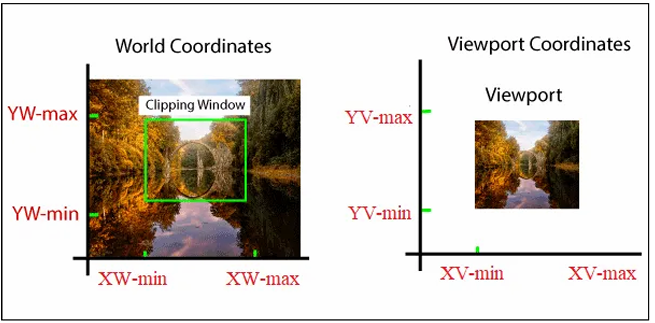
Often, the size of the viewport is different (smaller or larger) than the window. To ensure the relative position of the objects remains identical, we use a Normalized Point. The equation looks like this:
$$\frac{X_w - X_{wmin}}{X_{wmax} - X_{wmin}} = \frac{X_v - X_{vmin}}{X_{vmax} - X_{vmin}}$$
$$\frac{Y_w - Y_{wmin}}{Y_{wmax} - Y_{wmin}} = \frac{Y_v - Y_{vmin}}{Y_{vmax} - Y_{vmin}}$$
By solving these equations, we can find the viewport point $(X_v, Y_v)$: $X_v = X_{vmin} + (X_w - X_{wmin})S_x$ $Y_v = Y_{vmin} + (Y_w - Y_{wmin})S_y$
Here, $S_x$ and $S_y$ are the Scaling Factors for the X and Y axes: $$S_x = \frac{X_{vmax} - X_{vmin}}{X_{wmax} - X_{wmin}}$$ $$S_y = \frac{Y_{vmax} - Y_{vmin}}{Y_{wmax} - Y_{wmin}}$$
📝 Math Walkthrough
I practiced with this mathematical example:
- Window boundary: $X_{wmin}=20, X_{wmax}=80, Y_{wmin}=40, Y_{wmax}=80$
- Viewport boundary: $X_{vmin}=30, X_{vmax}=60, Y_{vmin}=40, Y_{vmax}=60$
- We need to map a point $(X_w, Y_w) = (30, 80)$ to the viewport.
Step 1: Calculate the Scaling Factors: $S_x = \frac{60 - 30}{80 - 20} = \frac{30}{60} = 0.5$ $S_y = \frac{60 - 40}{80 - 40} = \frac{20}{40} = 0.5$
Step 2: Find the viewport point $(X_v, Y_v)$: $X_v = 30 + (30 - 20) \times 0.5 = 30 + 5 = 35$ $Y_v = 40 + (80 - 40) \times 0.5 = 40 + 20 = 60$ So, the point $(30, 80)$ in the window becomes $(35, 60)$ in the viewport!
- Why it matters: Without this transformation, objects in games or apps would stretch, distort, or go out of bounds if you resized the screen. It perfectly maintains the correct aspect ratio of the image.
[!NOTE] IMPORTANT NOTES FOR NOTEBOOK Concept: Window to Viewport Transformation Key Point 1: Maps 2D object descriptions from world coordinates (Window) to device coordinates (Viewport). Key Point 2: Maintains the relative position of objects using mathematical formulas and Scaling Factors ($S_x, S_y$). Advantage: Ensures images are scaled accurately across different device screens without distortion. Disadvantage: Requires continuous mathematical calculations for every point, which can increase rendering time for heavy graphics.
হ্যালো! আজ আমি কম্পিউটার গ্রাফিক্সের একটি অত্যন্ত গুরুত্বপূর্ণ টপিক শিখলাম—Window to Viewport Transformation। চলো, একদম সহজ ভাষায় গল্প করার মতো করে পুরো বিষয়টি বুঝে নিই!
বন্ধুরা, প্রথমেই আমি বোঝার চেষ্টা করলাম Window to Viewport Transformation আসলে কী। সহজ একটা বাস্তব উদাহরণ দিই। মনে করো, তুমি তোমার ফোনের ক্যামেরা দিয়ে একটি বিশাল সুন্দর নদীর ওপর ব্রিজের ছবি তুলছ। ক্যামেরার স্ক্রিনে তুমি পুরো প্রকৃতির যতটুকু অংশ দেখতে পাচ্ছ, সেটা হলো তোমার World Coordinates বা Clipping Window। আর সেই ছবিটা যখন তুলে তোমার ফোনের গ্যালারিতে বা ফেসবুকের ছোট প্রোফাইল পিকচারের ফ্রেমে দেখাও, সেই ফ্রেমটা হলো Viewport।
- What it is: এটি হলো 2D ওয়ার্ল্ড-কোঅর্ডিনেট অবজেক্টগুলোকে ডিভাইসের স্ক্রিন কোঅর্ডিনেটে (ডিভাইস কোঅর্ডিনেট) রূপান্তর করার একটি গাণিতিক প্রক্রিয়া।
- How it works: আমি মূলত ৪টি নতুন টার্ম শিখেছি: ১. World Coordinate: যে কার্টেসিয়ান কোঅর্ডিনেটের সাপেক্ষে আমরা পুরো ড্রয়িং বা ডায়াগ্রামটি ডিফাইন করি। এর সীমানা হলো $X_{wmin}, X_{wmax}, Y_{wmin}, Y_{wmax}$। ২. Device Coordinate: আসল স্ক্রিনের কোঅর্ডিনেট যেখানে অবজেক্টগুলো দেখানো হবে। এর সীমানা হলো $X_{vmin}, X_{vmax}, Y_{vmin}, Y_{vmax}$। ৩. Window: ওয়ার্ল্ড কোঅর্ডিনেটের ভেতরের যে নির্দিষ্ট অংশটুকু আমরা ডিসপ্লে করার জন্য সিলেক্ট করি। ৪. Viewport: ডিভাইসের স্ক্রিনের সেই নির্দিষ্ট জায়গা যেখানে গ্রাফিক্সটা শেষমেশ প্রদর্শিত হয়।
নিচের ডায়াগ্রামটি দেখো:
অনেক সময় ভিউপোর্টের সাইজ উইন্ডোর চেয়ে ছোট বা বড় হতে পারে। তখন অবজেক্টের আপেক্ষিক অবস্থান (Relative position) উইন্ডো এবং ভিউপোর্টে একই রাখার জন্য Normalized Point ব্যবহার করা হয়। এর সমীকরণটি হলো:
$$\frac{X_w - X_{wmin}}{X_{wmax} - X_{wmin}} = \frac{X_v - X_{vmin}}{X_{vmax} - X_{vmin}}$$
$$\frac{Y_w - Y_{wmin}}{Y_{wmax} - Y_{wmin}} = \frac{Y_v - Y_{vmin}}{Y_{vmax} - Y_{vmin}}$$
এই সমীকরণ দুটি সমাধান করে আমরা ভিউপোর্টের পয়েন্ট $(X_v, Y_v)$ খুঁজে পাই: $X_v = X_{vmin} + (X_w - X_{wmin})S_x$ $Y_v = Y_{vmin} + (Y_w - Y_{wmin})S_y$
এখানে $S_x$ এবং $S_y$ হলো যথাক্রমে X এবং Y অক্ষের Scaling Factor (স্কেলিং ফ্যাক্টর): $$S_x = \frac{X_{vmax} - X_{vmin}}{X_{wmax} - X_{wmin}}$$ $$S_y = \frac{Y_{vmax} - Y_{vmin}}{Y_{wmax} - Y_{wmin}}$$
📝 ম্যাথ ওয়াকথ্রু
আমি নিজে এই গাণিতিক উদাহরণটি প্র্যাকটিস করেছি:
- Window boundary: $X_{wmin}=20, X_{wmax}=80, Y_{wmin}=40, Y_{wmax}=80$
- Viewport boundary: $X_{vmin}=30, X_{vmax}=60, Y_{vmin}=40, Y_{vmax}=60$
- আমাদের উইন্ডোর একটি পয়েন্ট $(X_w, Y_w) = (30, 80)$-কে ভিউপোর্টে ম্যাপ করতে হবে।
ধাপ ১: প্রথমে Scaling Factor বের করি: $S_x = \frac{60 - 30}{80 - 20} = \frac{30}{60} = 0.5$ $S_y = \frac{60 - 40}{80 - 40} = \frac{20}{40} = 0.5$
ধাপ ২: এবার ভিউপোর্টের পয়েন্ট $(X_v, Y_v)$ বের করি: $X_v = 30 + (30 - 20) \times 0.5 = 30 + 5 = 35$ $Y_v = 40 + (80 - 40) \times 0.5 = 40 + 20 = 60$ অতএব, উইন্ডোর $(30, 80)$ পয়েন্টটি ভিউপোর্টে গিয়ে হয়ে যাবে $(35, 60)$!
- Why it matters: এই রূপান্তর না থাকলে কম্পিউটার স্ক্রিনের সাইজ ছোট-বড় হলে ভেতরের ছবি বা গেমের অবজেক্টগুলো ফেটে যেত কিংবা স্ক্রিনের বাইরে চলে যেত। এটি ছবির সঠিক অনুপাত বজায় রাখে।
[!NOTE] IMPORTANT NOTES FOR NOTEBOOK Concept: Window to Viewport Transformation Key Point 1: Maps 2D object descriptions from world coordinates (Window) to device coordinates (Viewport). Key Point 2: Maintains the relative position of objects using mathematical formulas and Scaling Factors ($S_x, S_y$). Advantage: Ensures images are scaled accurately across different device screens without distortion. Disadvantage: Requires continuous mathematical calculations for every point, which can increase rendering time for heavy graphics.